Showing posts with label techtools. Show all posts

19 November 2007

Life After powerpoint – 50 Ways

Participate in the free K12 Online Conference

If you are weary of seeing student tasks presented in PowerPoint then I am with you. This is not to say that kids aren't pretty good at using the software. I have seen lots of student engagement working on PPT presentations, plenty of scope for peer learning and real experience of design principles - usually implicit. But there are plenty of other fun ways of presenting in our Web 2.0 world and Alan Levine has tried 50 of them.

Linked to another K12Online07 presentation, Alan has had a go at telling the same story in 50 different ways and the result, Dominoe 50 Ways, is a ready made menu for you to sample. If you prefer to start another way you could go a classified list of names and descriptions of the Story Tools. This also has a few examples of each. For a more guided narrative experience take yourself (and maybe a friend) through Alan's workshop 50 Web 2.0 Ways to Tell a Story.

Now, all tools are not created equal, but part of the learning is about finding the right one for your purpose. Explore and enjoy, and try letting some kids lose with this list. Below is my own first attempt at using Animoto:

31 October 2007

A Mirror to Practice - K12Online2007

Participate in the free K12 Online Conference


Well, the K12 Online Conference has finished for another year, and I didn't get very involved for all the usual reasons/excuses. But all is not lost if you have the slightest clue how to use iTunes - yes, it is on your computer so just open it. Then go to the store and search for k12online07. This will take you straight to the download page for both audio and video podcasts from the conference. I recommend subscribing to both if you use an mp3 player as you can sample the sessions that look promising via audio and later watch presentations which are of special interest.


The K12 Online 2007 Blog will provide you with information about each session. Browse the categories on the sidebar or search for what you are seeking. You can bypass iTunes by listening/viewing straight from the blog, and check out any related links.


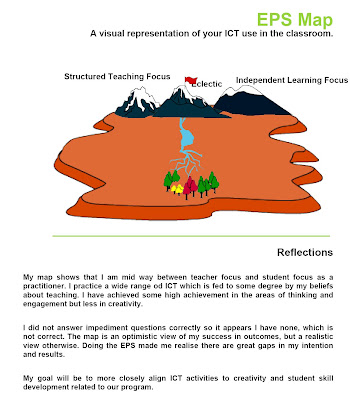
My first recommendation is NZer Derek Wenmoth's keynote Holding a Mirror to Professional Practice. Derek is a teacher educator and gives a fine presentation about his research into the connection between teacher beliefs, intentions and professional practice in the use of ICT. They have some interesting programs going which are worth hearing about, but the absolute best thing is their EPS - Educational Positioning System. This is a free to use online tool which takes you through a series of reflections on your teaching practice with ICT.


The result is a map of various elements - beliefs about teaching, use of ICT, relative success in achieving outcomes and obstacles to practice. My map is below, along with my hastily written reflection. In fact I think my practice looks better in the map than it really is, but it was completing the EPS that alerted me to many of the flaws in what I was doing. These included fairly tenuous links between technology used and outcomes, and a sad lack of opportunity for students to really be creative (represented by those stunted yellow shrubs). I completely mucked up the questions about infrastructure impediments so have no rocky passages in my river of practice.


I learned a lot from this and will go back to it when I think I have worked on some of the issues. But do watch Derek's presentation. It is well done, moves along at pace and will explain much better than I have about the EPS.
05 May 2007

EdTech: Focus on K-12

The cover story of the April/May 2007 issue of EdTech magazine addresses the important issue of cybersaftey.

Other articles discuss the growing popularity of podcasts in education, learning with the use of Web 2.0, and optimal classroom layout for use with one-to-one notebook programmes.

EDTECH: Focus On K-12 - April/May 2007

Also included are teaching ideas for 21st century learning. My favourite comes from Vicki Davis (key leader in the Horizon Project 2007) on Introduction to Wikis. In her 10th-grade class, students make movies and learn online safety through a class wiki.

EDTECH: Focus On K-12 - Lesson Plans II

Archives of previous issues are available also.

11 April 2007

Wetpaint enables private messaging!

Wetpaint, the online wiki community builder (that we have previously previewed), has released a major new feature, which is (surprisingly) about social networking (and communicating)! Teachers are finding Wetpaint a good tool to use - so this new enhancement lends itself to adaptation for education.

Wetpaint users can now send private messages to other users. The demand for a private messaging system became overwhelming for Wetpaint, and they’re happy to announce that messages can be sent from one user to another, from one user to many users, and from many users to many users. This is the first wiki of its kind to bring about this level of communication, and further blurs the lines between social networking and wikis. Many features are overlapping from various realms of communication tools, from widgets becoming available on social networks (and WetPaint wikis) to mainstream services incorporating social networking components.

Bringing in private messaging options for Wetpaint users really brings their community aspects full circle.

From: Mashable! - the Social Networking Blog.

If you want to keep in touch with the changes and developments in Web 2.0 tools, or want some of the latest code!, then take out an email feed from Mashable, or add it too your RSS reader. Mashable is the world's largest blog focused exclusively on social networks.

02 February 2007

Why would anyone want to blog?

Blogging has a lot going for it....but we don't often have time to stop and think about it, or have a presentation handy to show a group of people who just want to learn about the value of blogging.

This is the beauty of Slideshare..... a great online tool where you can create and save presentations, and then share them with others.

You could create things for your classes too! Or they could create things for you! What we want is to use Blogging effectively for learning and teaching is what it is really all about.

Catch this graphic on Using Blogs in Education.

Let me share a presentation with you titled
Weblogs.....why should I care? Click on the title to view via Slideshare, or just press play in the window below!

(For the bloggers amongst you, Slideshare allows you to use the URL to hyperlink, or embed the file directly into Blogger)


25 January 2007

Share your files anywhere, anytime!

In November 2006 I wrote about Box.net - our Web 2.0 sanity box - providing free storage, and linking of resources for blogs, myspace etc. We have a link in the right-hand navitation bar to quickly create your own space.

Mashable writes that now they’ve created a new Box.net widget , which adds even more functionality.

The Flash-based widget allows you to share all kinds of files: anything on your computer, plus music, photos and videos. Many of these file types can be viewed in the widget itself: you can view a photo, for instance, or play an MP3.

You can also transfer files between widgets: visit the MySpace page of ex-Grateful Dead bassist Phil Lesh and you can copy his music to your own widget, or just download it. (ohh, copyright.....)

Click on the image below and take a closer look at the widget!

06 December 2006

Travelling with Delicious ...

This week is Transition week for Year 10s at Delany.

One of their sessions is an introduction to Delicious, and the creation of their own 'digital bookshelves' for their coming 2 years in the senior school.

We took the time to explain that when the new Intranet comes, they will be able to link their delicious accounts into their Intranet resources and have the best of both worlds.

Delicious has networking, but no chat or other contact between users, so it can be difficult to identify network members. We have asked students to precede their chosen username with DC and end with their year level. So DCsweetpie11 and DCalistair12 would be easy to identify as our students. They seem happy enough with this.

I think Marion College has also set up Year 10 with delicious accounts too.

Any other schools introducing Web 2.0 tools to their senior students?

Jan@Delany

15 November 2006

Virtual Bookshelf - the 'shelfari' possibilities.....

I spotted this, and thought that this new Web 2.0 tool provides a great virtual tool, to create a great virtual display, and provide the option for virtual sharing of books.

I can see a virtual display like this sitting quite nicely as part of a library web site, library wiki, CeNet, or just a classroom blog.

Imagine the possibilities for promoting reading - premier's reading challenge? or anything really.........

Seems like a cool tool. Can't wait to see who gives Shelfari first go!

06 November 2006

Squirl: A site for collectors

If you like organising your things, and maybe even cataloguing things....if you like Library Thing, and if you are a collector of things, then Squirl might be the place for you.

Just this weekend I have been musing over my vast CD music collection, and thinking that a Library Thing approach to my CDs and even my vintage collectibles wouldn't be such a bad idea!

So being alerted to Squirl seemed timely and 'kinda fun!' Now I just want to see how many of my Library Thing friends make the jump! You have the option of creating a public or private collection, and a number of templates are provided. Squirl also incorporates the option of organising your book collection too - good if you want to keep things that you organise within the same management space.

02 November 2006

For anyone who didn't notice - let me bring to your attention the small icon on this top right hand of this blog.

Box.net is a Web 2.0 'sanity' box! as it provides you with a free 1 gb of storage space online. There are many other great features. Click on the icon on the right, and get yourself free online storage!

13 September 2006

Amazon unbox goes live!


AV Librarians...what do you think? I think it's an important moment to mark, as we begin the shift toward less DVD and CD releases and more online, download-style models.... I'll be interested in the first reviews of his product.

From Tame the Web: Libraries and Technology